Cortex Drag and Drop Canvas: Journey to Data Orchestration
TL; DR:
Cortex’s drag and drop interface transforms data orchestration, reaching crucial, actionable insights accessible for everyone at the right moment. With instant results upon pipeline creation, Cortex eliminates waiting time and empowers users to effortlessly orchestrate data, setting a new standard with its user-friendly drag and drop interface.
Cortex Applications
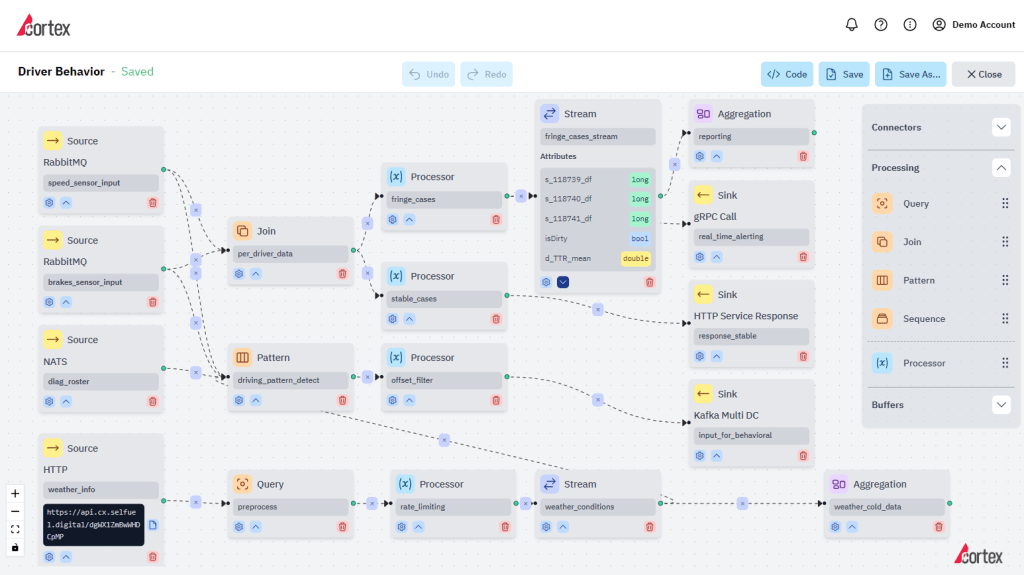
Imagine opening a blank canvas ready to capture the essence of your data strategy to get actionable insights at the moment you need them. In Cortex, this canvas is called an “application.” Each application serves as a space for constructing your business logic effortlessly. Here’s how Cortex’s drag-and-drop interface brings this canvas to life:
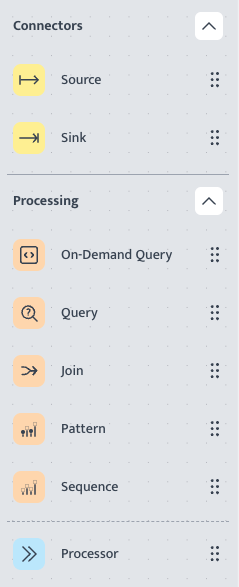
1. Connectors – Source & Sink Nodes:
- Begin your journey by adding Source Nodes where you input your data and define its format. Cortex simplifies data input, allowing users to seamlessly integrate various data sources.
- Guide the outcomes of your data orchestration by adding Sink Nodes. Specify where the results will be sent and in what format or action will be taken. Cortex ensures clarity in defining the final destination of your processed data.
2. Processing – Business Logic Nodes:
- Dive into the heart of your business strategy with Processing Nodes. Construct logical rules via queries, joins, patterns, sequences and processors effortlessly.
- Cortex provides an intuitive environment to design complex business logic without the need for extensive coding.
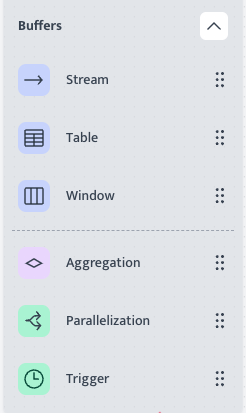
3. Buffers – Fine-tuning Nodes:
- Guide your pipeline with Buffer Nodes in a way that, it flows to bring correct outcomes. Structure your data through aggregation, lookups, deduplications, stream grouping, creating sequential windows and many more.
- Using buffer nodes, Cortex ensures,
- precision to get the needed results;
- a better user experience removing repetitive actions.
Visualizing Your Business Process: The Pipeline Concept
In Cortex, each application transforms into a visual representation of your business process. The format resembles a flowchart, making it easy for users to grasp the logic and flow of their data orchestration. The collective flow, comprised of Source, Business Logic, and Destination Nodes, is referred to as a “pipeline.”
Effortless Construction and Customization: Features of the Cortex Interface
1. Construct as Many Applications as Needed:
- Cortex offers the flexibility to create multiple applications, each tailored to ensure data orchestration on a specific aspect of your data strategy.
- Users can manage diverse aspects of their business, ensuring a comprehensive and customized approach.
2. Drag and Drop Pipelines:
- Experience seamless data orchestration with Cortex’s drag-and-drop interface.
- Effortlessly design and fine-tune pipelines by dragging and dropping nodes, ensuring an intuitive user experience.
3. Diverse Connectors for Varied Data Flows:
- Cortex empowers users to create dynamic data flows by utilizing various connectors, including sources, sinks, and distributed sinks with load balancers.
- The platform’s adaptability enables the integration of different data sources and destinations.
4. Use as Many Nodes as Needed:
- Eliminate constraints in designing complex business logic by utilizing as many nodes as required.
- Cortex supports a user-centric approach, allowing for extensive customization and adaptability in data orchestration.
5. Reusable Nodes and Components:
- Cortex promotes efficiency through the reuse of nodes and components across applications.
- Save time and maintain consistency by incorporating pre-built elements into new pipelines.
Real-Time Results: Instant Gratification for Your Data Orchestration Efforts
One standout feature of Cortex is its real-time processing capability. Once a user constructs a pipeline within an application and initiates it, the platform provides instant results. There’s no need to wait; users can swiftly obtain outcomes from their designed data orchestration, allowing for quick iterations and adjustments.
Conclusion: Cortex—Democratizing Data Orchestration
Cortex’s drag and drop interface structure breaks down the barriers of complexity in data orchestration. By offering a visual, user-centric approach, Cortex empowers users of all backgrounds to harness the full potential of their data. The seamless construction of pipelines, diverse connectors, and real-time results make Cortex a frontrunner in democratizing data orchestration for businesses navigating the digital landscape. We invite you to start your free trial with Cortex now. And don’t forget, if you need more ideas, we are always here to guide you.
Key Takeaways:
1. Effortless Orchestration:
Cortex simplifies data orchestration with a user-friendly drag and drop interface, providing a seamless experience for constructing pipelines.
2. Real-Time Processing:
Instant results upon initiating pipelines allow users to receive feedback and insights without delays, facilitating agile decision-making.
3. Adaptability and Reusability:
Cortex’s diverse connectors, support for numerous nodes, and reusable components enhance adaptability, efficiency, and consistency in data orchestration.

Aykut Teker
Aykut Teker is the co-founder of Selfuel, redefining innovation in data operations. Building on his extensive experience in enterprise and global R&D leadership, combined with a Ph.D. in theoretical and computational physics; he spearheads research and plays a pivotal role in shaping Selfuel’s groundbreaking, accessible, and scalable data processing platform.
 EN
EN
2 thoughts on “Cortex Drag and Drop Canvas: Journey to Data Orchestration”