Streamlining Order Process Monitoring 2024: Cortex Use Case

Efficiency and accuracy in order process monitoring for manufacturers are crucial for maintaining sales and customer satisfaction. In this use case we are going to deep dive how Cortex streamlines the process monitoring in the orders systems of a beverage company.
Problem Overview:
A beverage manufacturer stores its orders coming from its distributors in database table “Order Processing” and also all orders are stored in SAP database for operational purposes. In the past there has been cases that the order that has been created in Order Processing Table as “approved” has not been automatically added to SAP table due to system errors. This situation has created losses in sales.
Selfuel’s Solution: CDC for Process Monitoring
Selfuel team created a CDC (Change Data Capture) flow application for process monitoring that listens to both databases in order to capture orders that has been entered in Order Processing Table as “approved” but not entered to SAP system within 30 seconds. It then sends an email to related staff with the order ID information, records its data in an Alerts Table and creates an alert via an HTTP endpoint. There are 2 flows running simultaneously in this application.
- The flow that captures when an approved order is created in Order Processing Node System but it is not reflected in SAP Order system within 30 seconds and sends an email
- The flow that captures when an approved order is created in Order Table but it is not reflected in SAP Order system within 30 seconds and sends alert to an HTTP endpoint.
Application 1: Email Notification System
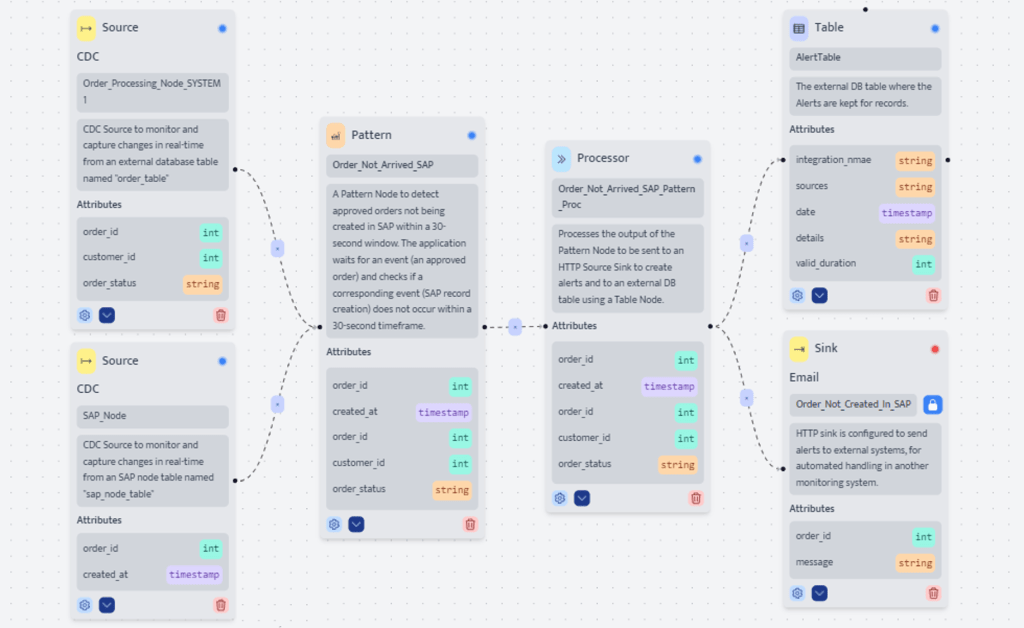
The application that performs process monitoring and triggering email notification is as follows:
Source 1 – Order Processing System
The first CDC source receives events when INSERT events are triggered for the Order Processing System 1 MySQL table. So, when an order is created in this system. This source node monitors it and collects 3 order attributes when each order arrives:
- Order ID
- Customer ID
- Order Status
Source 2 – SAP Node
The second CDC source receives events when INSERT events are triggered for the SAP Node database table. So, when an order is created in this system. This source node monitors it and collects 2 order attributes when each order arrives:
- Order ID
- Created At (Timestamp)
Pattern – Order ID Not Created
Both sources are connected to a Pattern node which aims to capture the cases when an order which has been entered in Order Processing System1 as “approved” but hasn’t been entered to SAP node within 30 seconds. Pattern is set to detect 2 set of conditions:
- First State: This state monitors the orders in Order Processing System 1 and filters the orders with the Order Status as “Approved”
- Second State: This state monitors the order whose ID matches with the order entered in the first state but is not created in SAP Database within 30 seconds.
Processor – Order ID Data Organization
The pattern node is connected to the Processor Node, which organizes the data of the orders that did not arrive to SAP and send it to a record table and alert system. The processor node receives following attributes from pattern node:
- Order ID from SAP Node
- Created at from SAP Node
- Order ID from Order Processing Node System
- Customer ID from Order Processing Node System
- Order Status from Order Processing Node System
It transforms the event data to be sent to “Order Not Created in SAP” Sink with the rules below:
- Order ID of the order that matches in the 2 states defined in pattern node as “Order_id”
- Order Status of the order that matches in the 2 states defined in pattern node as “Message”
- It transforms the event data to be inserted as an action to “AlertTable” Table with the columns below:
- Returns “order2sap” as Integration Name
- Returns “ordersystem, sap” as Sources
- Returns the timestamp of incident occurrence in milliseconds detail as Date
- Returns Order ID of the order that matches in the 2 states defined in pattern node as Details
- Returns “20” as Valid Duration
Table – Alerts Table
The Processor node sends the Integration Name, Sources, Details and Valid Duration data to be stored in the Alerts Table
Sink – Email Trigger
It also sends the Order ID and the Message data to the “Order Not Created in SAP” Sink that aims to email the data of orders captured according to the rules set in Pattern node to related staff in a json format.
Flow 2: HTTP Endpoint Alerts
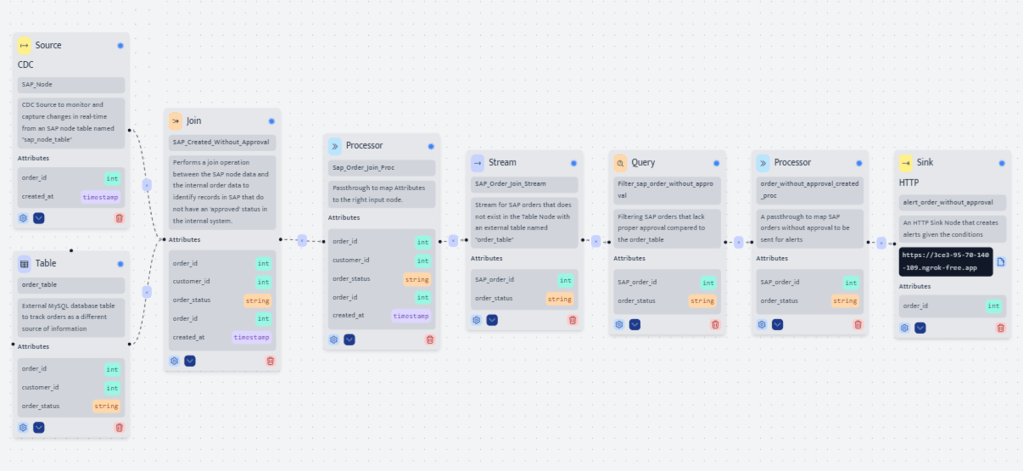
The application that performs process monitoring of Order Table and SAP node to send alerts is as follows:
Source 1 – SAP Node
The “SAP Node” CDC Source which is created in the first flow
Source 2 – Order Table
The “Order Table” Table that retrieves the following attributes from “order_table” MySQL database:
- Order ID
- Customer ID
- Order Status
Join – SAP Created Without Approval
The Join Node joins the data coming from SAP Node and Order Table with following rules:
- It matches the data of 2 tables from Order ID
- It collects only the data whose order status in Order table as “Approved”
Processor 1 – SAP Order Join Proc
The Processor node organizes the joined data to create a stream. It receives following attributes from pattern node:
- Order ID from Order Table
- Customer ID from Order Table
- Order Status from Order Table
- Order ID from SAP Node
- Created at from SAP Node
- It transforms the event data to be sent to “SAP_Order_Join_Stream” Stream with the rules below:
- Order ID of the SAP Node as “SAP_order_id”
- Order Status of the Order Table as “order_status”
Stream – SAP Order Join Stream
The Stream Node creates stream by organizing events into logical sequences based on time, with “SAP_order_id” and “order_status” and sends it to the Query Node.
Query – Filter SAP Order Without Approval
The Query Node filters the data in the Stream according to the rule that Order Status needs to be not equal to “Approved”
Processor 2 – Order Without Approval Created Proc
The Processor node transforms the SAP_order_id as “order_id” to send it to the alert sink.
Sink – Alert
The sink node named “alert_order_without_approval” sends the order ID data of the orders not approved in SAP to an HTTP endpoint in json format as alert.
Results and Impact
The implementation of this CDC-based process monitoring solution provides a remarkable potential improvement to the reliability and efficiency of the order processing system. It offers:
- Minimized Sales Losses: Ensuring that all “approved” orders are accurately reflected in the SAP system, eliminating the risk of sales losses due to system errors.
- Enhanced Operational Efficiency: The automatic alert system for discrepancies streamlines the process, reducing manual checks and speeding up order processing.
Conclusion
The use of Cortex in process monitoring of orders systems showcases the platform’s capability to address and solve complex data synchronization challenges effectively. This case study demonstrates Cortex’s potential to enhance operational efficiency through automation, providing a reliable and scalable solution for real-time data integration challenges. Start your free trial with your $150 free credits and experience the power of Cortex firsthand.

Aykut Teker
Aykut Teker is the co-founder of Selfuel, redefining innovation in data operations. Building on his extensive experience in enterprise and global R&D leadership, combined with a Ph.D. in theoretical and computational physics; he spearheads research and plays a pivotal role in shaping Selfuel’s groundbreaking, accessible, and scalable data processing platform.
 EN
EN